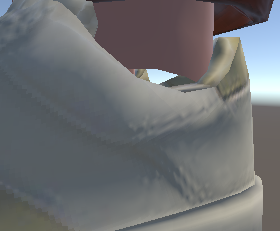
Some of the default footwear creates a gab between where the ankle stops rendering and where the shoe actually starts. I’d like the ankle to go all the way into the shoe please. I have attached a picture of what the ankle looks like when I import the avatar into Unity, but this is also visible in the character creator. This problem is true for quite a few different shoes, in particular ones that have lower ankles.
Hello @gregory_rpf !
Just tested quickly in the Unity SDK and I couldn’t replicate this issue.
Could you confirm which clothing items you are seeing this on? Could you also confirm your Unity SDK version and whether you made any changes to the default settings or Avatar Config?


Ignore the Unity skybox for a moment, I only used that so I could properly zoom in on the ankles which you can’t do in the web editor.
I’ve attached a gif demonstrating that the ankle problem is also present in the web editor. You just have to squint to see it, but I can see a difference between black and white on the inside of the shoe just under the ankle when I’m using these shoes. I think they’re called tennis-casual-01.
I’ve also added a photo of the green cleats having a similar issue, but in addition to the ankle being cut off it also sticks out in front of the tongue. These are called shoes-football-01.

